The WISHA Lifting Calculator is a quick ergonomic assessment tool from the Washington State Department of Labor and Industries that gives a weight limit for a lifting or lowering task and a lifting index for the actual load. Adapted from the Revised NIOSH Lifting Equation, it needs only six inputs: the weight, where the hands are, how far out they reach, how often and how long the lifting goes on, and whether the body twists.
This guide explains how the WISHA Lifting Calculator works, how to measure each task variable, and walks through two worked examples. Want to skip the math? Our free WISHA Lifting Calculator works out the weight limit and lifting index as you answer each step.
Note: This is a lengthy post! If you’d rather work your way through this guide with a PDF file, click here to download step-by-step guides to all of our recommended ergonomic assessment tools.
What is the WISHA Lifting Calculator?
The WISHA Lifting Calculator is a very effective and practical risk assessment tool for manual material handling tasks. Developed by the Washington State Department of Labor and Industries, this lifting calculator is very simple in design and application.
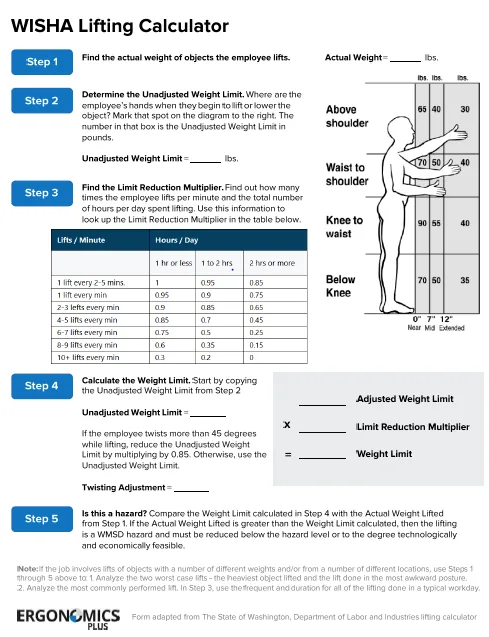
The WISHA Lifting Calculator is an adaptation of the Revised NIOSH Lifting Equation, which is based on scientific research on the primary causes of work-related back injuries. It can be used to perform simple ergonomic risk assessments on a wide variety of manual lifting and lowering tasks and can also be used as a screening tool to identify lifting tasks which should be analyzed further using the more comprehensive NIOSH Lifting Equation.
The WISHA Lifting calculator has some limitations in that it uses less precise measurement of lifting task variables and does not include the Vertical Distance (D) traveled or Coupling (C) components of the NIOSH Lifting Equation.
Weight limit and lifting index
Weight Limit: Answers the question… “Is this weight too heavy for the task?”
The primary output of the WISHA Lifting Calculator is the Weight Limit (or Lifting Limit), which defines the maximum acceptable weight (load) that nearly all healthy employees could lift or lower, given the task variables of the lifting task being evaluated, without increasing the risk of lifting related musculoskeletal disorders (MSD).
Lifting Index (LI): Answers the question… “How significant is the risk?”
A Lifting Index (LI) is calculated to provide a relative estimate of the level of physical stress and MSD risk associated with the manual lifting tasks evaluated. A Lifting Index value of 1.0 or less indicates a nominal risk to healthy employees. A Lifting Index greater than 1.0 denotes that the task is high risk for some fraction of the population. As the LI increases, the level of injury risk increases correspondingly. Therefore, the goal is to design all lifting jobs to accomplish an LI of 1.0 or less.
| Lifting index | What it means |
|---|---|
| 1.0 or less | The load is within the weight limit: nominal risk for most healthy workers |
| More than 1.0 | The load is over the weight limit: a work-related MSD hazard to reduce, with a redesign that brings the lifting index to 1.0 or lower |
Uses of the weight limit and lifting index
The Weight Limit and Lifting index can be used to guide or engineer lifting task design in the following ways:
1) The task variables used to calculate the Weight Limit can be analyzed to identify specific weaknesses in the design. For example, lifting with a horizontal reach over 12” or from the floor or above shoulder height significantly increases injury risk.
2) The Lifting Index can be used to estimate the relative injury risk from manual material handling for a certain task or job. The higher the Lifting Index, the smaller the percentage of workers capable of safely performing these job demands. Using the Lifting Index, ergonomic risk of two or more job designs can be compared.
3) The Lifting Index can also be used to prioritize ergonomic improvement and redesign efforts. Job task risk can be ranked by the index value and a control strategy can be implemented based on a priority order of individual lifting tasks or jobs.
WISHA weight limit formula
Weight limit = unadjusted weight limit × twisting adjustment × limit reduction multiplier
Lifting index = actual weight ÷ weight limit
Start with the unadjusted weight limit for where the hands are when the lift begins or ends, and how far they are from the body:
| Vertical hand position | Near (0 to 7 in) | Mid (7 to 12 in) | Extended (over 12 in) |
|---|---|---|---|
| Above shoulder | 65 lb | 40 lb | 30 lb |
| Waist to shoulder | 70 lb | 50 lb | 40 lb |
| Knee to waist | 90 lb | 55 lb | 40 lb |
| Below knee | 70 lb | 50 lb | 35 lb |
If the body twists 45 degrees or more, multiply by a twisting adjustment of 0.85; otherwise the adjustment is 1.0. Then multiply by the limit reduction multiplier for how often and how long the lifting goes on:
| Lifts | 1 hour or less | 1 to 2 hours | 2 hours or more |
|---|---|---|---|
| Less than once every 5 minutes | 1.00 | 1.00 | 1.00 |
| 1 lift every 2 to 5 minutes | 1.00 | 0.95 | 0.85 |
| 1 lift every minute | 0.95 | 0.90 | 0.75 |
| 2 to 3 lifts every minute | 0.90 | 0.85 | 0.65 |
| 4 to 5 lifts every minute | 0.85 | 0.70 | 0.45 |
| 6 to 7 lifts every minute | 0.75 | 0.50 | 0.25 |
| 8 to 9 lifts every minute | 0.60 | 0.35 | 0.15 |
| 10 or more lifts every minute | 0.30 | 0.20 | 0.00 |
WISHA Lifting Calculator and software
View full size image
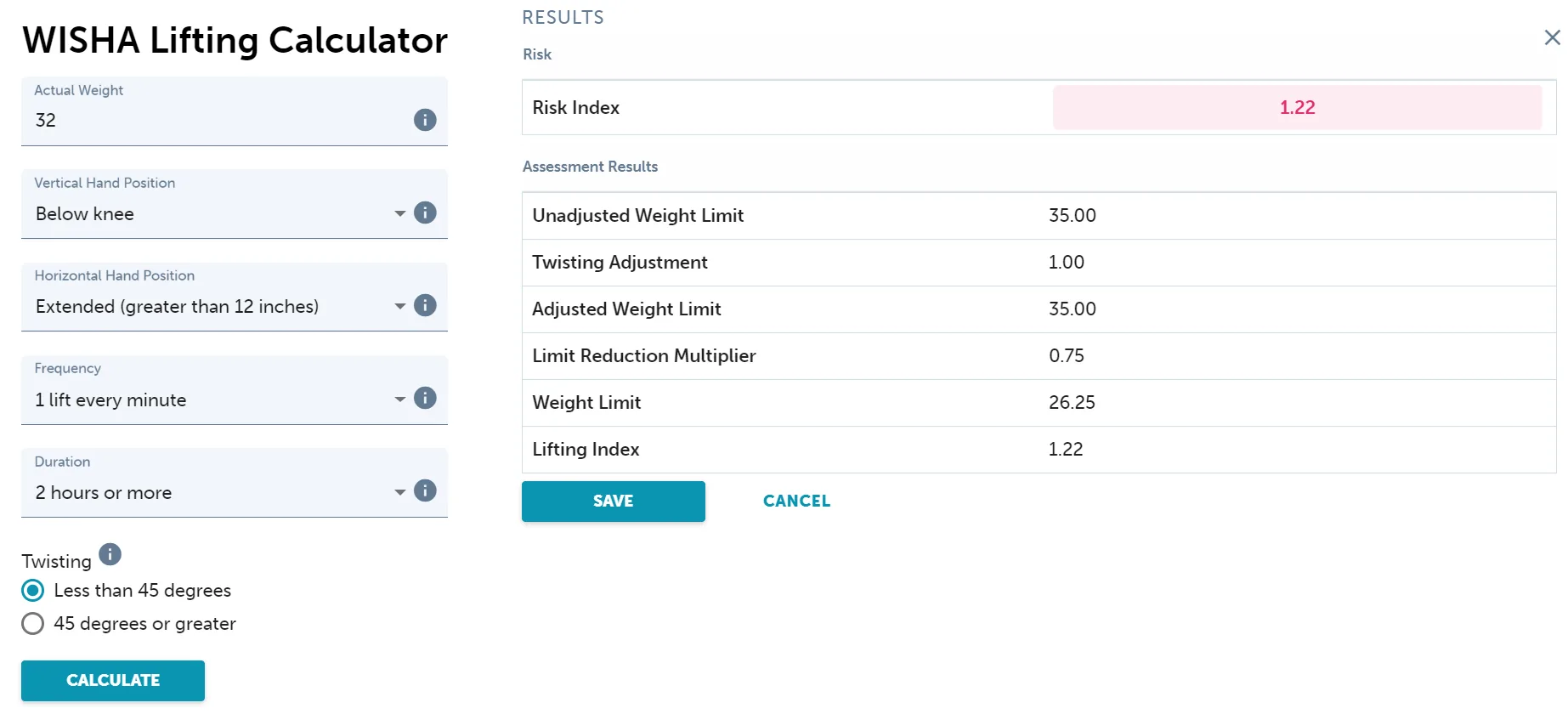
We have developed a cloud-based WISHA Lifting calculator as a part of our ErgoPlus Industrial platform that can be used to efficiently conduct a WISHA Lifting assessment, calculate the score and save your results. The task variables are simply selected or entered into the calculator fields. When the “calculate” button is pressed, the Weight Limit and Lifting Index (or Risk Index) outputs are automatically calculated and can then be saved to your database.
- Free WISHA Lifting Calculator: answer each step and see the weight limit and lifting index as you go. Print the result or save it as a PDF.
- ErgoPlus Industrial: the WISHA Lifting Calculator in our ergonomics software saves every assessment, so you can compare jobs, share reports and track improvements across worksites.
How to use the WISHA Lifting Calculator
To prepare for the assessment using the WISHA Lifting Calculator, you will first need to gather information about the job, interview supervisors and workers, and observe workers performing lifting and lowering tasks.
Selection of the lifting tasks to be evaluated should be based on the most difficult and demanding lifting or lowering tasks, such as the heaviest objects lifted from the most awkward positions (for example; below knees, above shoulder, and/or farthest reach).
If the job involves lifting of various objects with several different weights and/or from a few different locations, we recommend: 1) Analyze the two worst case lifts—the heaviest object lifted, and the lift performed in the most awkward posture. 2) Analyze the most commonly performed lift, using the frequency and duration for all the lifting done in a typical workday.
Measure and enter the task variables
Task variables needed to calculate the Weight Limit and Lifting Index when using the WISHA Lifting Calculator:
1) Weight
2) Vertical Hand Position
3) Horizontal Hand Position
4) Frequency
5) Duration
6) Twisting
Here are some quick explanations and guidelines that you can use to gather the needed measurements for the WISHA Lifting Calculator:
1) Weight – Determine the actual Weight of the object being lifted. Often, you can obtain the weight of the load from labeling on the object or from company production or shipping records. If necessary, use the nearest scale in the facility to determine the exact weight of any load being lifted. You will usually be able to find a scale in shipping and receiving departments. If the weight of the load varies significantly, you should obtain the average and maximum weights lifted.
2) Vertical Hand Position – Determine the Vertical Hand Position of the employee’s hands relative to the knees, waist, and shoulders of the worker as they begin to lift, lower, or place the object. The Vertical Location has four selection options; 1) Below Knee, 2) Knee to Waist, 3) Waist to Shoulder, or 4) Above Shoulder
3) Horizontal Hand Position – Determine the Horizontal Hand Position by measuring the distance between the point projected on the floor directly below the mid-point of the hands grasping the object (load center), and the mid-point of a line between the toes. Note: This method differs from the NIOSH Lifting Equation, which measures the distance between the mid-point of the hands (or load center) and the mid-point of the inside ankle bones. You will select one of the following three options: 1) 0-7” = Near, 2) 7-12” = Middle, or 3) >12” = Extended
4) Frequency – Determine the average number of lifts per minute of the lifting task being evaluated, this is the lifting frequency. This information can often be verified by asking for average production rates from a group leader, supervisor, or production manager. You can also accomplish this by determining the number of lifts per minute during a short 15-minute sampling or observation period. You will select the closest of the five options given in the calculator.
5) Duration – Determine the lifting duration as classified into one of three categories: 1) 1 hour or less, 2) 1 – 2 hours, or 3) 2 hours or more.
6) Twisting – Determine the degree to which the body is required to twist or turn during the lifting task. The twisting angle is the amount (in degrees) of trunk and shoulder rotation required by the lifting task. Note: Sometimes the twisting is not caused by the physical aspects of the job design, but rather by the employee using poor body mechanics. If this is the case, no twisting (0 degrees) is required by the job. If twisting is required by the design of the job, determine whether it is less than 45 degrees, or 45 degrees or more. And don’t forget to train the workplace athlete to use proper body mechanics to avoid unnecessary twisting!
After task variables are determined, you will simply enter the data into the calculator and push the “Calculate” button for the results of the assessment.
WISHA Lifting Calculator example 1: DC lifting task

Step 1: Determine and record the task variables
The workplace athlete lifts and transfers boxes of product in the shipping department of a distribution center. The variables for this example are as follows:
Weight of Load = 32 pounds
Vertical Hand Position = Below knee
Horizontal Hand Position = Extended (greater than 12”)
Frequency = 1 lift every minute
Duration = 2 hours or more
Twisting = Less than 45 degrees
Step 2: Calculate the results
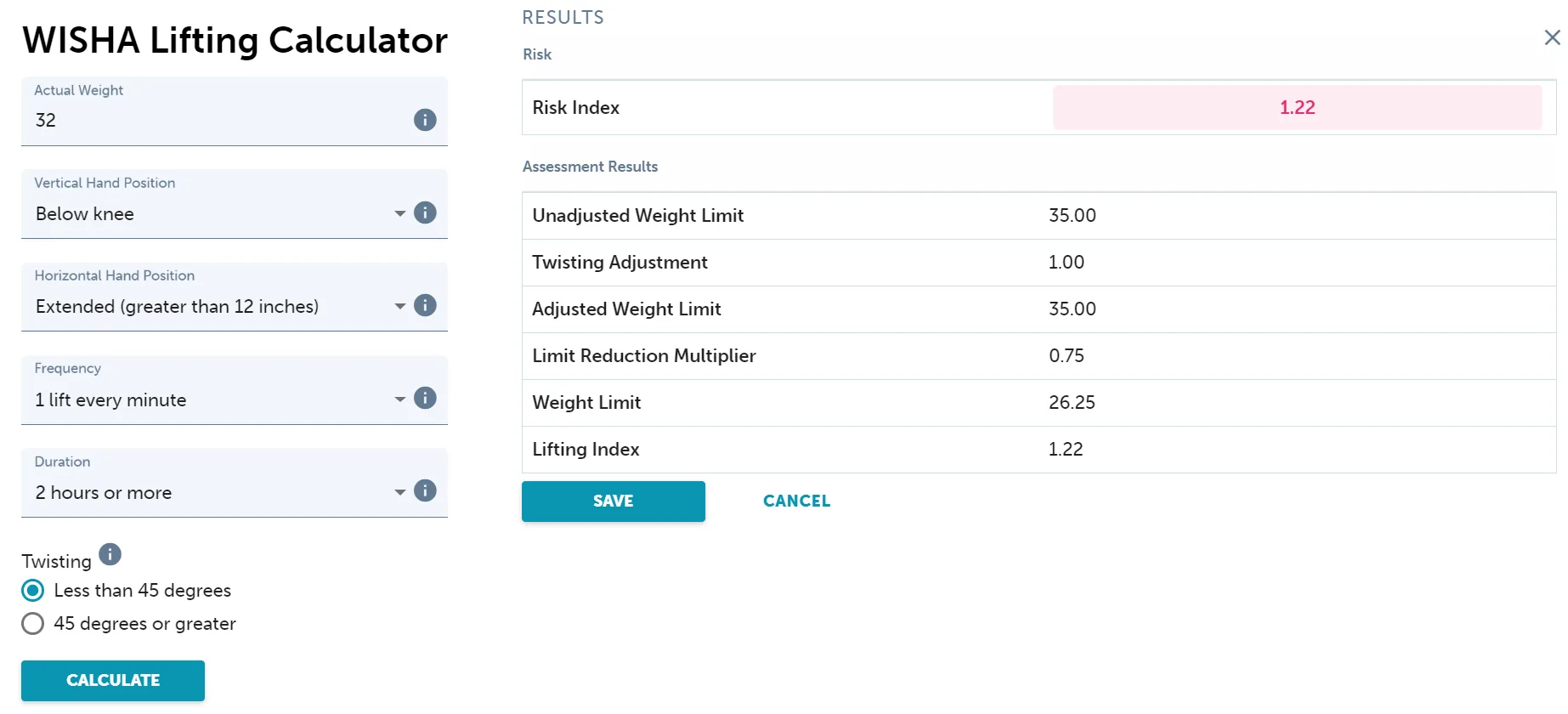
| Step | Result |
|---|---|
| Unadjusted weight limit (below knee, extended) | 35.00 lb |
| Twisting adjustment (less than 45 degrees) | 1.00 |
| Adjusted weight limit | 35.00 lb |
| Limit reduction multiplier (1 lift a minute, 2 hours or more) | 0.75 |
| Weight limit | 26.25 lb |
| Lifting index (32 ÷ 26.25) | 1.22 |
The 32 lb load is over the 26.25 lb weight limit, so this lift is a hazard to reduce. The extended reach below the knee sets a low starting limit of 35 lb. Open example 1 in the free WISHA Lifting Calculator.
WISHA Lifting Calculator example 2: parts rack stocking
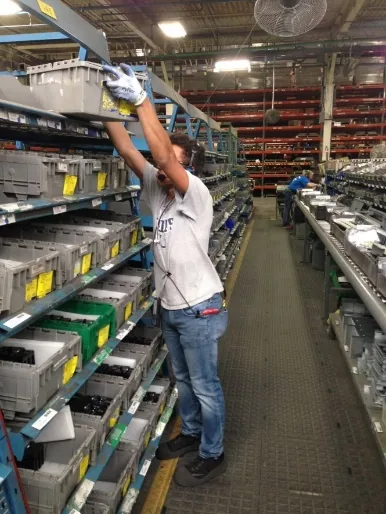
Step 1: Determine and record the task variables
The workplace athlete lifts parts containers to stock an assembly line parts rack. The variables for this example are as follows:
Weight of Load = 32 pounds
Vertical Hand Position = Above shoulder
Horizontal Hand Position = Extended (greater than 12”)
Frequency = 2-3 lifts every minute
Duration = 2 hours or more
Twisting = 45 degrees or more
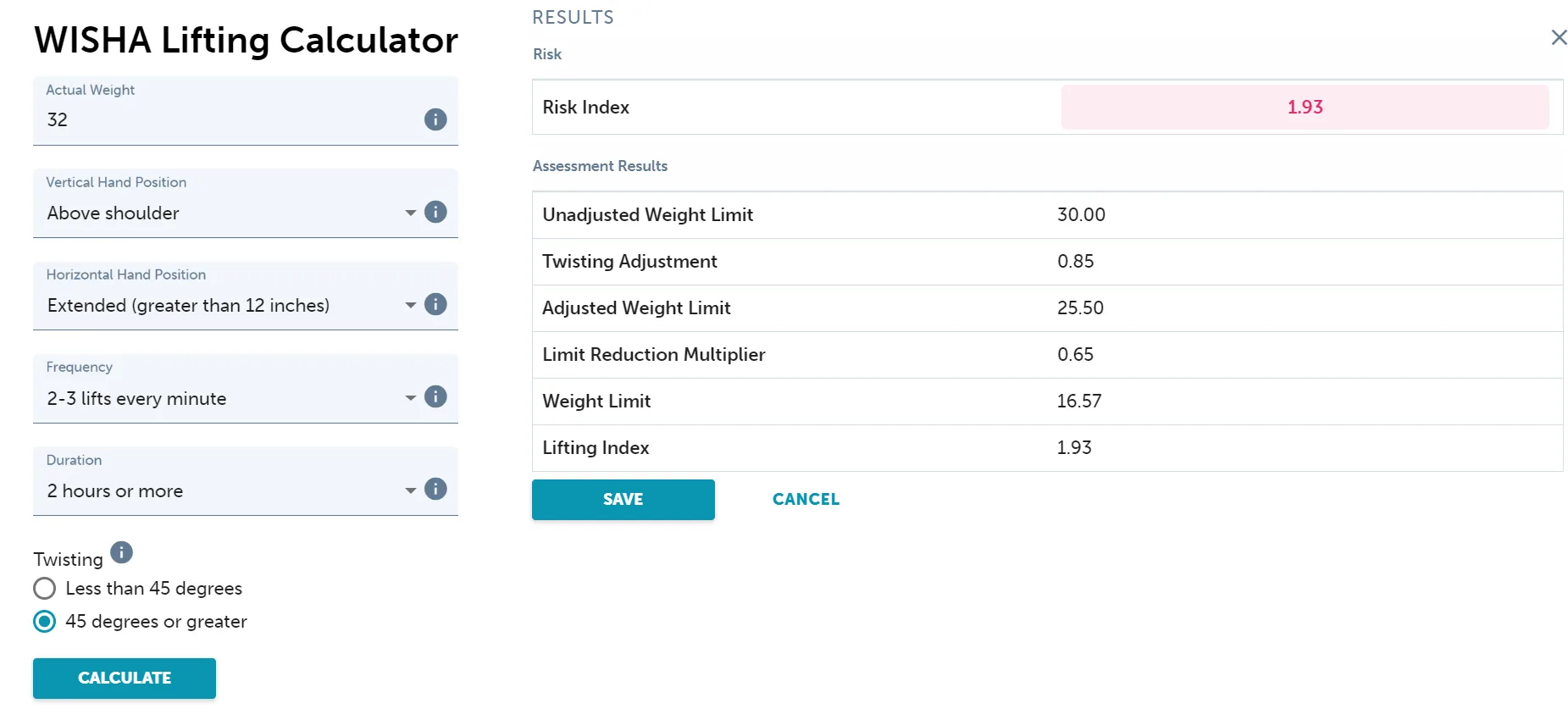
Step 2: Calculate the results
| Step | Result |
|---|---|
| Unadjusted weight limit (above shoulder, extended) | 30.00 lb |
| Twisting adjustment (45 degrees or more) | 0.85 |
| Adjusted weight limit | 25.50 lb |
| Limit reduction multiplier (2 to 3 lifts a minute, 2 hours or more) | 0.65 |
| Weight limit | 16.57 lb |
| Lifting index (32 ÷ 16.57) | 1.93 |
The 32 lb container is almost twice the 16.57 lb weight limit. Lifting above the shoulder with an extended reach, the twisting and the lifting rate all cut the limit. Open example 2 in the free WISHA Lifting Calculator.
WISHA Lifting Calculator or NIOSH Lifting Equation?
The WISHA Lifting Calculator is a quick screen built on the NIOSH Lifting Equation. Use it to find the lifts that need a closer look, then use the NIOSH equation for those:
| WISHA Lifting Calculator | NIOSH Lifting Equation | |
|---|---|---|
| Inputs | Six choices: weight, hand height and reach, frequency, duration and twisting | Measured hand positions, travel distance, twisting angle, frequency, duration and grip |
| Not included | Vertical travel distance and coupling (grip) | Pushing, pulling, carrying and one-handed lifts |
| Output | Weight limit and lifting index | Recommended weight limit and lifting index, at the origin and destination |
| Best for | Quick screening of many lifts | A detailed analysis of one lift |
See our step-by-step guide to the NIOSH Lifting Equation or the free NIOSH Lifting Equation calculator.
FAQ
Common questions about the WISHA Lifting Calculator
What does WISHA stand for?
WISHA is the Washington Industrial Safety and Health Act. The lifting calculator comes from the Washington State Department of Labor and Industries (L&I), which enforces WISHA through its Division of Occupational Safety and Health (DOSH).
Is the WISHA Lifting Calculator only for Washington State?
No. It was developed by Washington State L&I, but anyone can use it as a quick lifting screen. It is based on the Revised NIOSH Lifting Equation, so the weight limits rest on the same research.
How do I measure the horizontal hand position?
Measure from the point on the floor directly below the middle of the hands to the midpoint between the toes, then choose near (0 to 7 inches), mid (7 to 12 inches) or extended (more than 12 inches). This differs from the NIOSH Lifting Equation, which measures from the midpoint between the inner ankle bones.
What is the limit reduction multiplier?
It lowers the weight limit for lifting that happens often or for many hours a day. Look it up in the table by lifts per minute and hours per day: lifting less than once every 5 minutes keeps the full limit (1.0), while 10 or more lifts a minute for 2 hours or more reduces it to zero.
How do I assess a job with several different lifts?
Analyze the two worst-case lifts, the heaviest object and the lift done in the most awkward posture, then analyze the most common lift using the frequency and duration of all the lifting done in a typical workday.
When should I use the full NIOSH Lifting Equation instead?
Use the WISHA calculator to screen lifts quickly. When a lift is close to or over its weight limit, or when the travel distance or grip matter, analyze it with the NIOSH Lifting Equation, which uses measured positions and includes both.
References
- Washington State Department of Labor and Industries. Lifting calculator, the basis of the worksheet above.
- Waters, T. R., Putz-Anderson, V., Garg, A., & Fine, L. J. (1993). Revised NIOSH equation for the design and evaluation of manual lifting tasks. Ergonomics, 36(7), 749–776. https://doi.org/10.1080/00140139308967940
- Waters, T. R., Putz-Anderson, V., & Garg, A. (1994). Applications Manual for the Revised NIOSH Lifting Equation (DHHS (NIOSH) Publication No. 94-110). https://www.cdc.gov/niosh/docs/94-110/
Free Download: Step-by-Step Guides to Recommended Ergonomic Assessment Tools
Learn how to conduct fast and accurate assessments using the most popular ergonomic assessments tools.
 Please fill out the form below and we’ll email a link to your resources right away.